Expandable modularization with Tuist Part 1 - Understanding modularization

Introduction
As the iOS development culture matures and staff grows, most teams are adopting modularity.
As teams grow and app features increase, codebases become larger and harder to manage. Modularization helps reduce complexity, improve development speed, and support long-term scalability.
However, in general, there are many cases where modularization is simply considered a trend without properly considering the reason and purpose.
In this four-part series, we’ll cover modules and modularization, then implement the approach in practice with Tuist.
First, let me introduce how the InnoSquad team thinks about modularization.
Why modularization?
Increasing amount of code
As code grows, scalability, readability, and overall code quality often suffer. Modularization helps reduce complexity by separating concerns and dividing code into logical units.
Easier Feature Expansion
In a monolithic structure, adding or modifying new features affects the entire code. However, modularization allows you to isolate specific functionality and limit the scope of changes.
Larger Team Size
When multiple people work on the same code base, code conflicts and merge issues often arise. Modularization avoids these problems and makes parallel work easier.
Benefits of Modularity
- Improved code reusability
Specific features or components can be easily reused in other projects.
It helps reduce development time and maintain code consistency.
- Improved collaboration efficiency
Large development teams may have multiple developers working on different features at the same time.
You can create an environment where you can collaborate efficiently while being less dependent on each other’s work.
- Strict access control
Modules allow you to easily control what content you expose to other parts.
Everything except the public interface can be marked as internal or private to prevent use outside the module.
- Scalability
Following the principle of separation of concerns, the scope of impact of changes can be minimized by lowering the degree of coupling.
- Ownership
Each module can have a dedicated owner who is responsible for maintaining the code, fixing bugs, adding tests, and reviewing changes.
- Encapsulation
Encapsulation means that each part of the code should have minimal knowledge of the other parts. Separated code is easier to read and understand.
Each module focuses on a single responsibility, making your code organized and easier to understand.
- Testability
Provides an environment where each module can be tested independently.
- Ease of maintenance
Dividing the app into modules allows each part to be understood and modified independently. It makes maintenance much easier by allowing you to modify or update specific functionality without having to figure out the entire code chunk.
Modularization breaks code into smaller pieces so that modifications to specific modules have minimal impact on the overall system.
Dependencies between modules are reduced, minimizing the impact of modifying one module on other modules.
- Build time
Modular apps can reduce build times compared to rebuilding the entire app because you only need to rebuild modules that have changed.
You can take advantage of parallel builds.
- Module usability
Heavy modules can be developed by replacing them with Mocks.
Instead of building the entire project, you can create and use a sample app with only specific function modules. (Camera app, MyPage app, etc.)
Disadvantages of Modularization
- Difficulty in determining the level of granularity of modules
Too much granularity will result in overhead due to build complexity and increased boilerplate code.
If you are too rough, the modules will be too large and you may miss out on the modularity benefits.
For example, in small projects, a single data module can be enough. As complexity grows, you may need to split storage and data source into separate modules.
- Over-engineering
Unnecessarily trying to modularize everything can result in an overly complex system (in reality, not modularizing anything might be a simpler solution).
If your project is unlikely to grow beyond a certain threshold, you won’t be able to enjoy the scalability and build time benefits.
- Dependency Management
As dependencies between modules increase, understanding and coordinating interactions becomes difficult.
- Potential performance overhead
Modularization can sometimes lead to poor performance. Additional overhead may occur due to communication or data exchange between modules.
- Learning curve
Because modular systems often have more complex structures, the learning curve can be steeper when new developers join the project.
What is modularization?
Modular programming is a software design technique that emphasizes separating a program’s functionality into independent, replaceable modules.
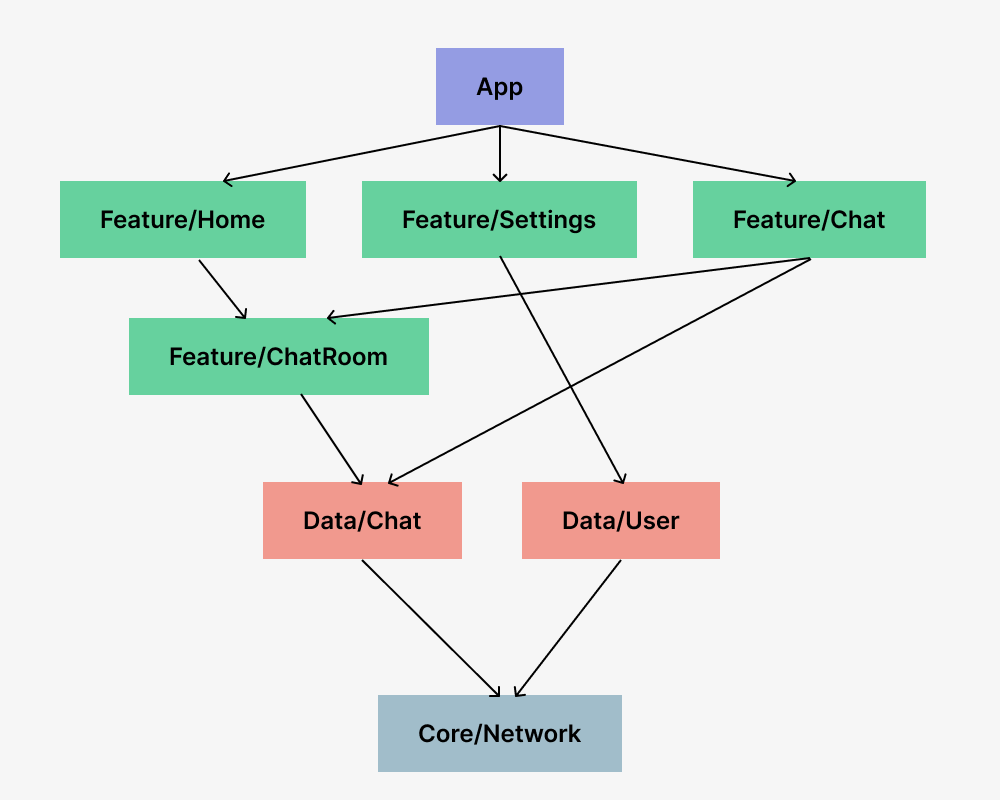
Module: In software design, a unit decomposed into functional units and abstracted to a level that can be reused and shared.
Usually, an independent entity capable of performing a complete function on its own
Code chunks for reuse in apps
- In iOS, it means Library, Framework, Package.
Modularization: A software design technique that improves software performance and facilitates debugging/testing/integration/modification of the system.
- The process of breaking down a huge problem into smaller pieces to make it easier to handle
How should we split modules?
Principles
- Low Coupling
This means that modules should be as independent as possible from each other.
Changes in one module should have no or minimal impact on other modules.
A module does not need to know the inner workings of another module.
Maintaining low coupling reduces dependencies between modules.
This makes changes easier to manage and improves maintainability and scalability.
- High Cohesion
Modules must have clearly defined responsibilities and remain within the scope of specific domain knowledge.
(In an eBook application, book-related code and payment-related code are different functional domains and should be separated into separate modules.)
Maintaining high cohesion clarifies the roles and responsibilities of modules and improves readability and understandability of code.
Common modularization patterns
In practice, modularization is often built by combining these three patterns:
- Layered architecture
Separate concerns into distinct layers: data, business logic, and presentation.
- Feature modules
Group related functionality into feature-specific modules.
- Core modules
A central area that provides shared utilities and components across the app.
Let’s look at each one in more detail.
Data Module
Typically, it includes repository, datasource, and model.
The main roles of data modules are:
- Encapsulates all data and business logic in a specific domain
Each data module must process data representing a specific domain. We can process many different types of data, as long as the data is relevant.
- Expose storage to external API
The data module’s public API should be a repository because it is responsible for exposing the data to the rest of the app.
- Hide all implementation details and data sources from the outside world
Data sources must be accessible only from the repository of the same module. It is not disclosed to the outside world.
Feature Module
A feature refers to an independent app functionality that typically corresponds to a screen or series of closely related screens (such as a sign-up or payment flow).
Features are associated with screens or destinations in your app. Therefore, it is likely that ViewModel will be connected to the UI for handling logic and state. A single feature need not be limited to a single view or single navigation target.
Function modules depend on data modules.
App Module
An app module is the entry point to your application.
App modules depend on feature modules and typically provide root navigation.
Build Configuration allows you to compile a single app module into multiple binaries.
Core Module
Contains code frequently used by other modules.
It serves to reduce redundancy and does not represent a specific layer of the app architecture.
- UI Module
If your app uses custom UI elements or elaborate branding, it’s a good idea to encapsulate your widget collection into one module so that you can reuse all functionality. This allows you to make your UI consistent across different features. For example, if you have a unified theme setup, you can avoid the headache of refactoring when a rebrand occurs.
- Analytics Module
Typically, tracking is driven by business requirements without any consideration of software architecture. Analytics trackers are often used in multiple unrelated components, in which case it is recommended to use a dedicated Analytics module.
- Network Module
If many modules require network connectivity, consider a dedicated module that provides an HTTP client. This is especially useful when client configuration is customized.
- Utility Module
Utilities, also known as helpers, are usually small pieces of code that are reused throughout an application. Examples of utilities include test helpers, currency formatting functions, email validators, or custom operators.
Conclusion
In this post, we covered:
This was a useful opportunity for the InnoSquad iOS team to realign on modularization principles.
In the next post, we will move to a practical baseline setup with Tuist: Basic modularization with Tuist.