Properly implement Naver login (Nearo) with SwiftUI (no copy-pasting)
Prerequisites
We assume you have a basic understanding of Pod, Carthage, SPM, etc.
Introduction
When I first integrated Naver Login, I found many copy-paste guides that worked only in a narrow setup.
Some of them introduced patterns that would almost certainly break in team collaboration or CI/CD environments. This post is a cleaned-up version based on practical usage.
That was also the trigger for starting this blog.
Main Guide
Project settings (explained on a Pod basis)
1. Pod install
After creating the project folder, run pod init to create a Podfile.
Add the contents below to this Podfile and then run the pod install command.
1
2
3
4
5
6
target '<ProjectName>' do
  use_frameworks!


  pod 'naveridlogin-sdk-ios'
end
A .xcworkspace file will then be created, which we will use to continue our work.
2. Register application at Naver Developers
When you register for Naver Login, Naver requires both a Download URL and a URL Scheme.
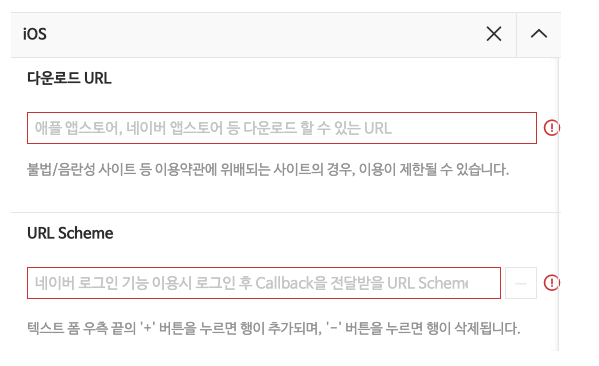
For the Download URL, use your App Store URL in the format
https://apps.apple.com/app/id{APP_ID_FROM_APP_STORE_CONNECT}.For URL Scheme, just enter the appropriate string (in lowercase letters).
3. Add information to project settings
After registering the application in Naver Developers, return to the project and modify the project settings.
- info.plist settings
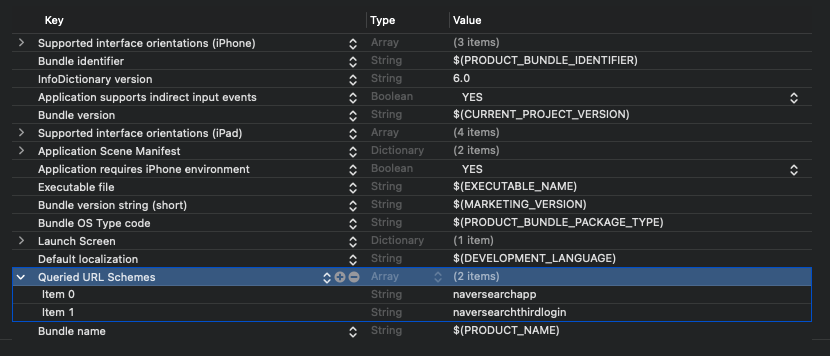
Add LSApplicationQueriesSchemes (Array type) to project settings - [Info] - [Custom iOS Target Properties].
item 0: naversearchapp item 1: naversearchthirdlogin
- URL Scheme Settings
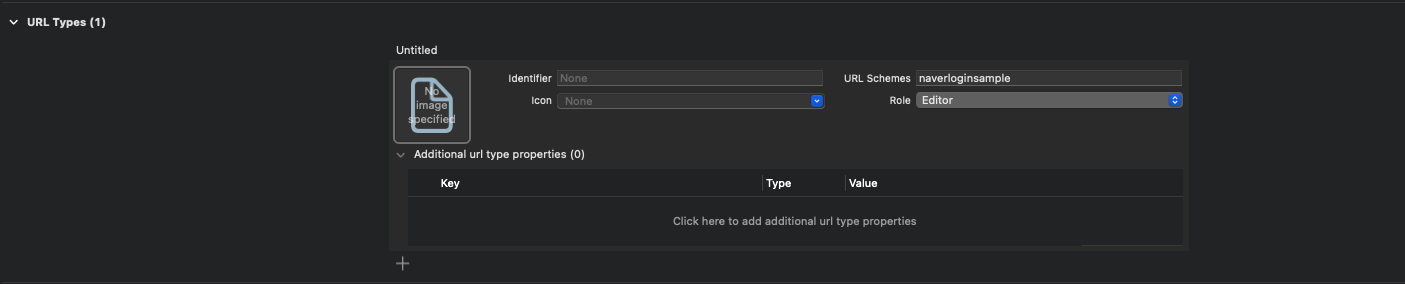
Add a new type to Project Settings - [Info] - [URL Types],
Add the previously created URL Scheme to the URL Schemes area. (naverloginsample is used here)
Notes
Other guides explain that you need to assign a value to #define inside the Pods folder.
This works, but running pod update resets previously modified values.
Managing it this way can easily cause issues in team collaboration or CD automation.
Write code
(For this guide, we treat the Naver login button as an independent component and screen.)
1. Written by App.swift
1
2
3
4
5
6
7
8
9
10
11
12
13
@main
struct NaverLoginSampleApp: App {

    init() {
        NaverLogin.configure() // 1. Apply base configuration for Naver login
    }

    var body: some Scene {
        WindowGroup {
            ContentView()
        }
    }
}
2. Created by NaverLogin.swift
1
2
3
4
5
6
7
8
9
10
11
12
13
14
15
16
17
18
19
20
21
22
23
24
25
26
27
28
29
30
31
32
33
34
35
36
37
38
39
40
41
42
43
44
45
46
47
48
49
50
51
52
53
54
55
56
57
58
59
60
61
62
63
64
65
66
67
68
69
70
71
72
73
74
75
76
77
78
79
80
81
82
83
84
85
86
87
88
89
90
91
92
93
94
95
96
97
98
99
100
101
102
103
104
105
106
107
108
109
110
111
112
113
114
115
116
117
118
119
import Foundation

import NaverThirdPartyLogin


final public class NaverLogin: NSObject {
    public static let shared = NaverLogin()

    static func configure() {
        NaverThirdPartyLoginConnection.getSharedInstance().isInAppOauthEnable = true
        NaverThirdPartyLoginConnection.getSharedInstance().isNaverAppOauthEnable = true

        NaverThirdPartyLoginConnection.getSharedInstance().serviceUrlScheme = "naverloginsample"
        NaverThirdPartyLoginConnection.getSharedInstance().consumerKey = "[Value from Naver Developers]"
        NaverThirdPartyLoginConnection.getSharedInstance().consumerSecret = "[Value from Naver Developers]"
        NaverThirdPartyLoginConnection.getSharedInstance().appName = "Your App Name"
        NaverThirdPartyLoginConnection.getSharedInstance().delegate = NaverLogin.shared
    }

    private override init() { }
}

// MARK: - Public method
public extension NaverLogin {
    func login() {
        guard !isValidAccessTokenExpireTimeNow else {
            retreiveInfo()
            return
        }

        if isInstalledNaver {
            NaverThirdPartyLoginConnection.getSharedInstance().requestThirdPartyLogin()
        } else {
            NaverThirdPartyLoginConnection.getSharedInstance().openAppStoreForNaverApp()
        }
    }

    func logout() {
        NaverThirdPartyLoginConnection.getSharedInstance().resetToken()
    }

    func unlink() {
        NaverThirdPartyLoginConnection.getSharedInstance().requestDeleteToken()
    }

    func receiveAccessToken(_ url: URL) {
        guard url.absoluteString.contains("[URL scheme registered in Naver Developers]://") else { return }
        NaverThirdPartyLoginConnection.getSharedInstance().receiveAccessToken(url)
    }

}

// MARK: - Private variable
private extension NaverLogin {
    var isInstalledNaver: Bool {
        NaverThirdPartyLoginConnection.getSharedInstance().isPossibleToOpenNaverApp()
    }

    var isValidAccessTokenExpireTimeNow: Bool {
        NaverThirdPartyLoginConnection.getSharedInstance().isValidAccessTokenExpireTimeNow()
    }
}

// MARK: - Private method
private extension NaverLogin {
    func retreiveInfo() {
        guard isValidAccessTokenExpireTimeNow,
            let tokenType = NaverThirdPartyLoginConnection.getSharedInstance().tokenType,
            let accessToken = NaverThirdPartyLoginConnection.getSharedInstance().accessToken else {
            NaverThirdPartyLoginConnection.getSharedInstance().requestAccessTokenWithRefreshToken()
            return
        }

        Task {
            do {
                var urlRequest = URLRequest(url: URL(string: "https://openapi.naver.com/v1/nid/me")!)
                urlRequest.httpMethod = "GET"
                urlRequest.allHTTPHeaderFields = ["Authorization": "\(tokenType) \(accessToken)"]
                let (data, _) = try await URLSession.shared.data(for: urlRequest)
                let response = try JSONDecoder().decode(NaverLoginResponse.self, from: data)

            } catch {
                await NaverThirdPartyLoginConnection.getSharedInstance().requestAccessTokenWithRefreshToken()
            }
        }
    }
}

// MARK: - Delegate
extension NaverLogin: NaverThirdPartyLoginConnectionDelegate {
    // Required
    public func oauth20ConnectionDidFinishRequestACTokenWithAuthCode() {
        // Called when token issuance succeeds
        retreiveInfo()
    }

    public func oauth20ConnectionDidFinishRequestACTokenWithRefreshToken() {
        // Called when token refresh succeeds
        retreiveInfo()
    }

    public func oauth20ConnectionDidFinishDeleteToken() {
        // Logout
    }

    public func oauth20Connection(_ oauthConnection: NaverThirdPartyLoginConnection!, didFailWithError error: Error!) {
        // Called when an error occurs
    }


    // Optional
    public func oauth20Connection(_ oauthConnection: NaverThirdPartyLoginConnection!, didFinishAuthorizationWithResult recieveType: THIRDPARTYLOGIN_RECEIVE_TYPE) {

    }

    public func oauth20Connection(_ oauthConnection: NaverThirdPartyLoginConnection!, didFailAuthorizationWithRecieveType recieveType: THIRDPARTYLOGIN_RECEIVE_TYPE) {

    }
}
Login, logout, unlink, and URL-scheme handling are implemented through public methods.
After login via a private method, account information is fetched through OpenAPI.
When using the url scheme control (receiveAccessToken function), the URL scheme value registered in Developers is checked to determine if it is the URL requested by Naver for login.
3. Created by NaverLoginResponse.swift
1
2
3
4
5
6
7
8
9
10
11
12
13
14
15
16
17
18
19
20
21
22
23
24
25
26
27
28
29
30
31
import Foundation

struct NaverLoginResponse: Decodable {
    var response: NaverResponse

    struct NaverResponse: Decodable {
        let id: String // Unique user identifier issued per Naver account
        let nickname: String
        let name: String
        let email: String
        let gender: String // F: female, M: male, U: unknown
        let age: String // user age range
        let birthday: String // user birthday (MM-DD)
        let birthyear: Int
        let mobile: String
        let profileImage: URL?

        enum CodingKeys: String, CodingKey {
            case id
            case nickname
            case name
            case email
            case gender
            case age
            case birthday
            case birthyear
            case mobile
            case profileImage = "profile_image"
        }
    }
}
Data that can retrieve information provided by Naver.
It has been confirmed in the document that all values are required and null is not provided.
- Written by
Content.swift
1
2
3
4
5
6
7
8
9
10
11
12
13
14
15
16
17
18
19
import SwiftUI

struct ContentView: View {
    var body: some View {
        VStack {
            Button(action: { NaverLogin.shared.login() }) {
                Image(systemName: "globe")
                    .imageScale(.large)
                    .foregroundStyle(.tint)
                Text("Naver Login")
            }
        }
        .padding()
    }
}

#Preview {
    ContentView()
}
- When logging in, use the form
NaverLogin.shared.login().
Conclusion
The integration process itself is not complicated once the project configuration is correct.
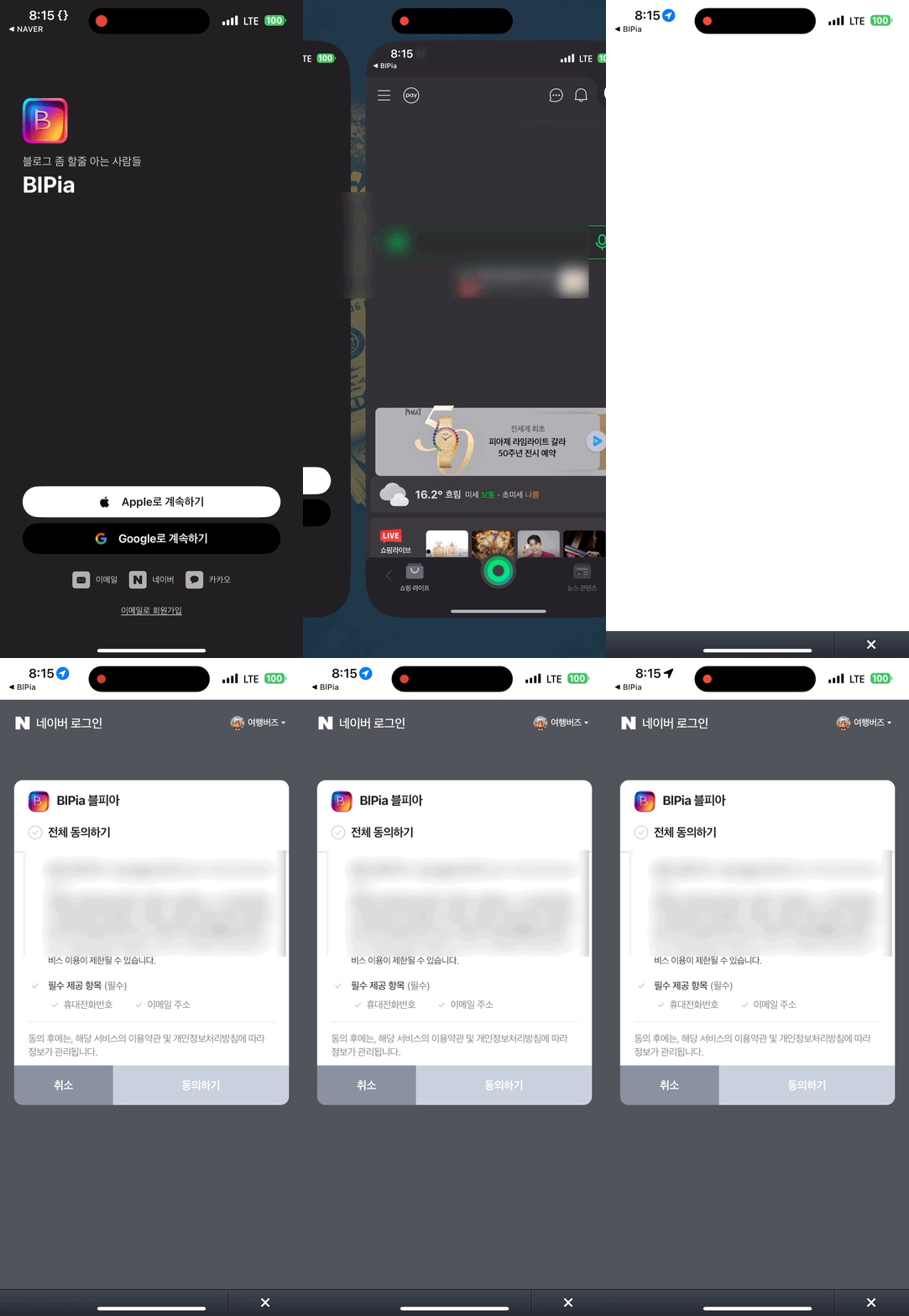
The flow is shown below: the app switches context during login and returns with the authentication result.
Sample code can be found at here.
If you find outdated or incorrect details, feel free to leave a comment.